BDSP Poké Radar RNG
Introduction
Poké Radar RNG manipulation in Brilliant Diamond/Shining Pearl allows us to reliably reach specific chain lengths for higher, guaranteed IV counts, and boosted shiny rates. We can then use these bonuses to optimally target Pokémon in Poké Radar grass patches by predicting details such as IVs, Nature, Shiny status, Ability, and Gender. While BDSP's Poké Radar is notoriously unforgiving in casual play, the right tools and a proper understanding of its mechanics make it possible to consistently build long chains for perfect Pokémon.
Tools and Applications
Installation Instructions
- Download
ARSEand extract the contents of the download to a clean, empty folder at a known location on your computer. - Download
SysBot.NET - Moarencounterbotsand extract the contents of the download to a clean, empty folder at a known location on your computer. - Download
sys-botbaseand extract theatmospherefolder to the root of your Switch SD card, then reboot the console into your chosen CFW environment.
Finding Switch IP
- After launching your CFW environment, enter the Homebrew Menu by clicking the
Albumbutton on the Switch home screen. - Press the
Ybutton on your controller. This will cause a pop-up to appear. Your console IP will be visible here. - Memorize your IP or take note of it somewhere on your computer. This IP address will be used to connect to the programs listed above.
DISABLING GAME MODS AND CHEATS
You will need to remove all mods or cheats for the game you are playing before proceeding. Mods/cheats can alter the RNG of the games and cause RAM reads to fail. Switch mods/cheats are stored in the atmosphere/contents directory on your SD card. This folder is typically empty on a fresh installation of Atmosphère.
Methods for Disabling Mods/Cheats
Any of these methods can work to disable mods/cheats. You should select the best one for your use case.
- Rename the
atmosphere/contentsfolder to something else, such asoldcontents. This will allow you to keep everything you previously installed. You can simply rename the folder back when done. - Delete the
atmosphere/contentsfolder. This may be a good option if you have many files in this directory that you do not recognize and you want to clean out your SD card. - Delete specific mods/cheats from the
atmosphere/contentsfolder. This requires you to know which title ID corresponds to what. - If you wish to keep the
atmosphere/contentsfolder intact, you can holdLevery time you boot the game.
Note - Some sys-modules that are not necessary for these tools can still cause interference if they are present on your Switch. If you are still experiencing issues, remove all unnecessary sys-modules that were not required by this guide.
Program Overview
Figure 1 - ARSE Overview
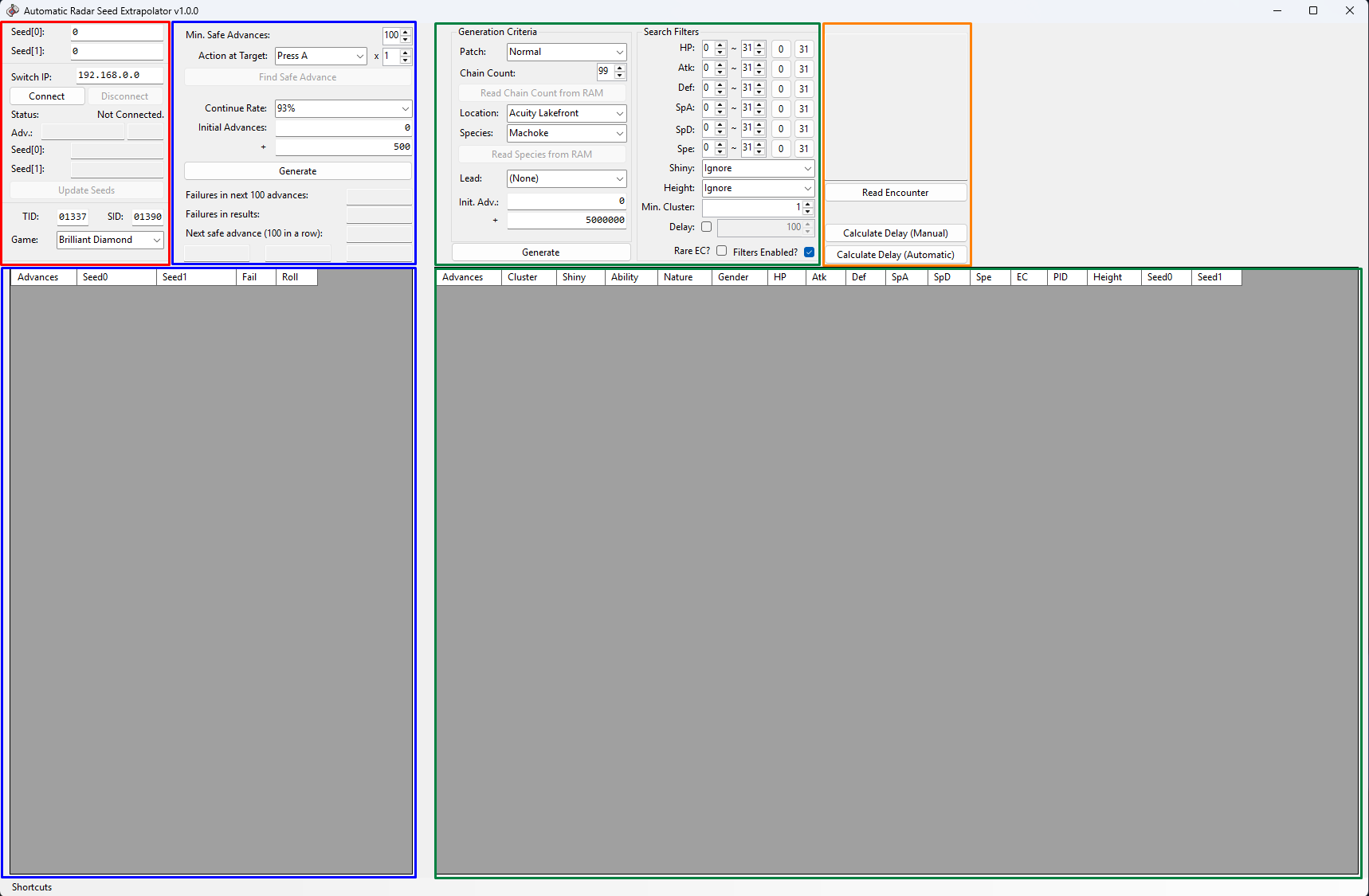
ARSE is an all-in-one tool that combines searching and automation to simplify the process of manipulating the Poké Radar chain length. We will be using it to search for frames that safely continue the radar chain as well as frames that generate ideal Pokémon among upcoming wild encounters. It offers nifty automation features to make the process more consistent!
Window Layout
- Far Left - Connect your console to the program to read and manage seed or save file information.
- Center Left - Enter chain length automation instructions, find and predict safe frames for chain continuation, and enter extra settings such as chain continuation rate.
- Center right - Set chain length/species information, enter search criteria for encounters, and search for target frames.
- Far Right - Read live encounter data and calculate encounter delays.
If anything written here does not immediately make sense, it will be described in greater detail later in the guide.
Figure 2 - Moarencounterbots Overview
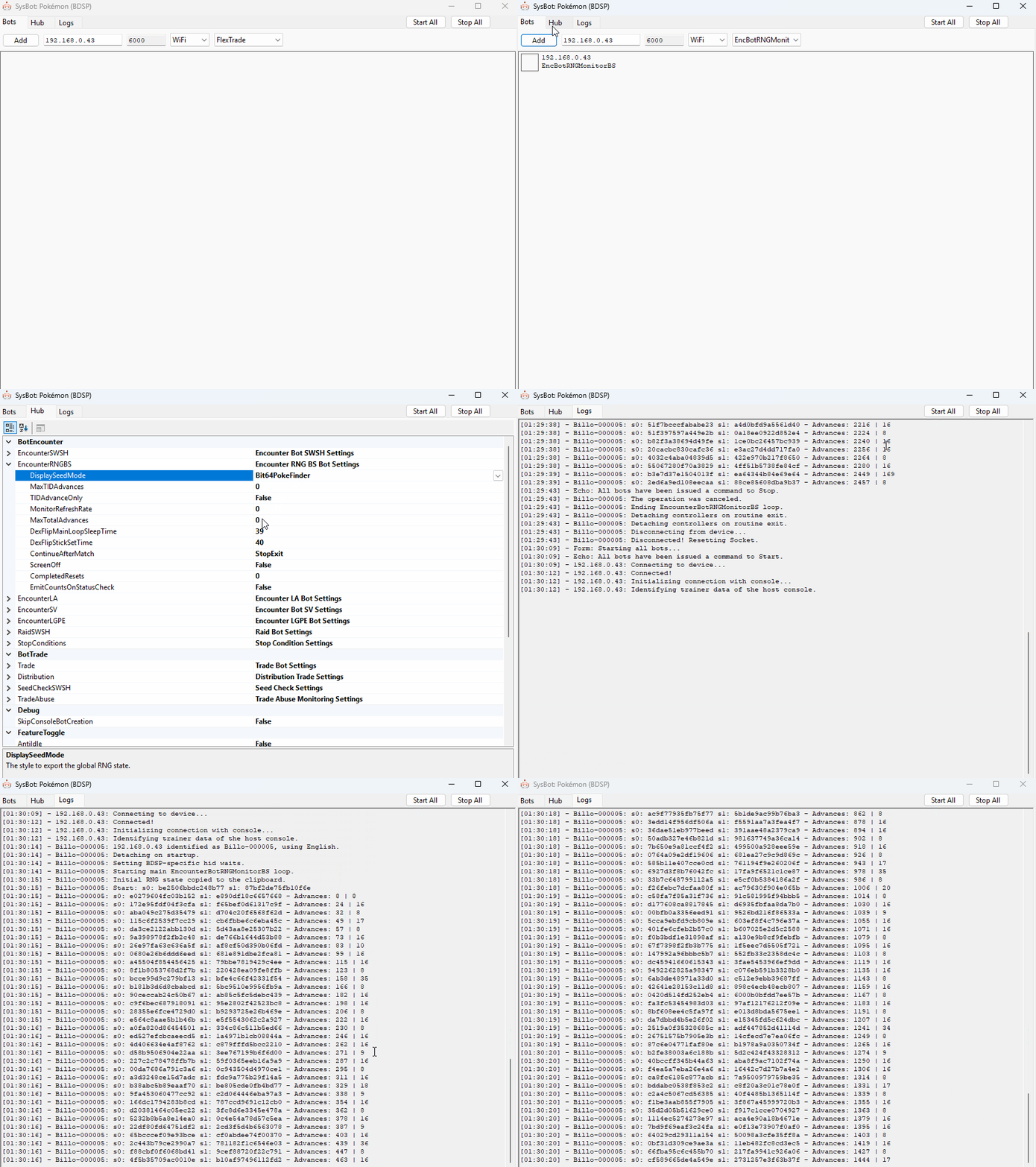
Moarencounterbots is used to monitor the RNG state and automate RNG advancements for distant targets. By default, the program is configured to work with the most recent Switch game, which is not BDSP. To fix this issue you will need to change the Mode by doing the following:
Initial Bot Configuration
- Open
SysBot.exeonce, then close it. This will generate a file namedconfig.jsonin the same folder. Make sure all instances ofSysBot.exeare closed before moving on. - Open
config.jsonin a text editor like Notepad. - Change the
Modeto 2 (this represents BDSP) and save the change. Close the text editor. - Launch the program again. You should now see BDSP in the program header.
- Navigate to the
Hubtab and expand theEncounterRNGBScategory underBotEncounter. - Change
DisplaySeedModetoBit64. - Ensure that
MonitorRefreshRateis set to0. - Closing the program will automatically save these settings.
Bot Tabs
Bots- Add/remove or start/stop the bots. Available bot programs are listed in the dropdown menu on the right.Hub- The central hub for settings to control how your bot operates.Logs- Monitor any currently active bots.
Bot Types
EncBotRNGMonitorBS- Monitor your RNG state in real time.EncBotCopySeedBS- Copy your RNG seed to clipboard at any point.EncBotDexFlipBS- Automatically advance the RNG state until a given point by flipping between PokéDex pages.
Visit the official Moarencounterbots Wiki for more information about program features.