Mystery Gift Injection
Introduction
"Wonder Cards" are essentially a key given to the game to allow a player to redeem a specific Pokémon or item from an event distribution in Generation 3-9. This guide showcases how to inject Wonder Cards as safely as possible and outlines how to avoid any potential legality issues you may run into during this process.
Why inject Wonder Cards?
Event distributions typically only run for a limited time, which means that after the event distribution period ends it becomes inaccessible through normal gameplay. For this reason, trusted community members dump and preserve the raw files used to generate event distributions so that players can access them even after the event distribution period has ended.
Is this considered legitimate?
The term "legitimate" is used to describe gameplay intended by the game developers. Since these methods require save editing in some way, shape or form it is not considered legitimate by raw definition. However, injected Wonder Cards generate the Pokémon or item the same way the game does, so you can draw your own conclusion about if you consider this method to be acceptable for your use case.
Can this be done on retail hardware?
No. At a minimum you will need a piece of hardware or Custom Firmware installed to extract your save file from the cartridge or console. Redeeming the event distribution can be done on retail hardware after editing your save file.
Does this hold any ban risk?
At the time of writing, there have been no reports of being banned or having their online access restricted from using any of the tools featured in this guide. That said, using homebrew always carries some risk, and you are responsible for any consequences that may occur. As long as you follow the steps carefully and use the tools responsibly you should not run into any issues.
Does x trading community allow this method?
I do not know. Some communities may consider Pokémon from injected event distributions to be fine for trading, while others may consider them to be illegitimate. Confirm the rules surrounding event injection in the community you participate in. I will not be held responsible for any community punishments that occur as a result of you trading Pokémon obtained from injected Wonder Cards.
GBA Setup Instructions
Necessary Tools
- PKHeX & WC3 Plugin
- Gen 3 WCTool
- A method of extracting your save file (make multiple backups!)
Note - You will need to download the Gen 3 WCTool regardless of the method you plan to use to inject the distribution as this contains all of the necessary Wonder Cards.
PKHeX & WC3 Plugin Installation
- Download
PKHeXand extract it to a known location on your computer, then create a folder namedpluginsin the same folder asPKHeX.exe. - Download the
WC3 Pluginand extract it into thepluginsfolder. - On Windows 10/11 you may need to unblock the WC3 plugin, you can do this by right-clicking it and clicking
Properties. - After opening the properties sub-window, look for an
Unblockcheckbox at the bottom and select it, then clickApply. - Launch
PKHeX.exeand confirm that it opens with no issues, if you are prompted to install a .NET Runtime version do this first. - Extract your GBA save file and place it inside a known location on your computer, then open the save file using PKHeX (
File -> Open -> Select the .sav file). - If everything was done correctly you should see the WC3 Plugin inside the
Toolssection of PKHeX (visual demonstration).
Gen 3 WCTool Installation
- Download the
Gen 3 WCTooland extract it to a known location on your computer, launch the program and make sure it opens properly with no issues. - Extract your GBA save file and place it inside a known location on your computer, then open the save file in the WC3 Tool (
Load Save File -> Select the .sav file). - If the program displays an error about the save file language, select the
Override Regionbutton and manually select a language. - Click the
Official Event Distributorbutton on the main window to open a subwindow, open your save file inside the subwindow and override the region again. - You should now see the event distributions that corrispond to your save file language are now properly selectable in the subwindow (visual demonstration).
Figure 1 - Enabling Mystery Gift
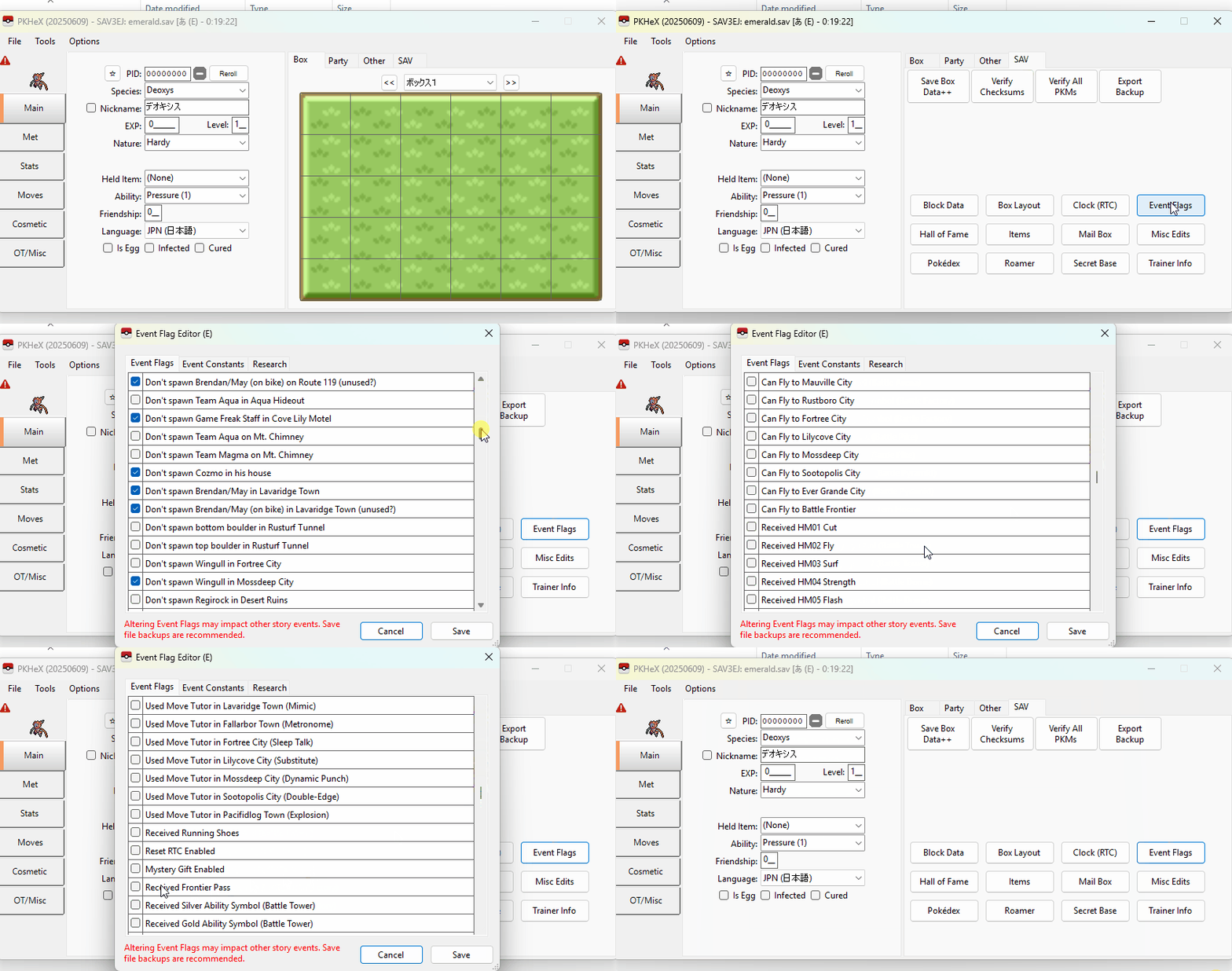
In this example we will be injecting the Old Sea Map (Mew) using PKHeX, this event was only distributed on Japanese copies of Pokémon Emerald, so we will be using a Japanese Emerald save file to keep things legal. It is advisable to do your own research to ensure that you are injecting your desired event into a save file of the correct language.
Since we are using a completely fresh save file with low story progress we will need to grant access to the Mystery Gift feature before doing anything else. You do not need to follow this section if you have already gained access to Mystery Gifts on your save file using the Poké Mart questionnaire.
Mystery Gift Unlock (Using PKHeX)
- Open the save file in PKHeX if you have not already done so.
- Click the
SAVtab, then selectEvent Flags. - Scroll down the list until you find the
Mystery Gift Enabledcheckbox and select it. - Click the
Savebutton to apply the changes.
Mystery Gift Unlock (Using Gen 3 WCTool)
- Open the save file in Gen 3 WCTool if you have not already done so.
- Click the
Extrabutton, then selectEnable Mystery Gift/Event. - Export the save file and overwrite your current existing save file.
Figure 2 - Wonder Card Injection
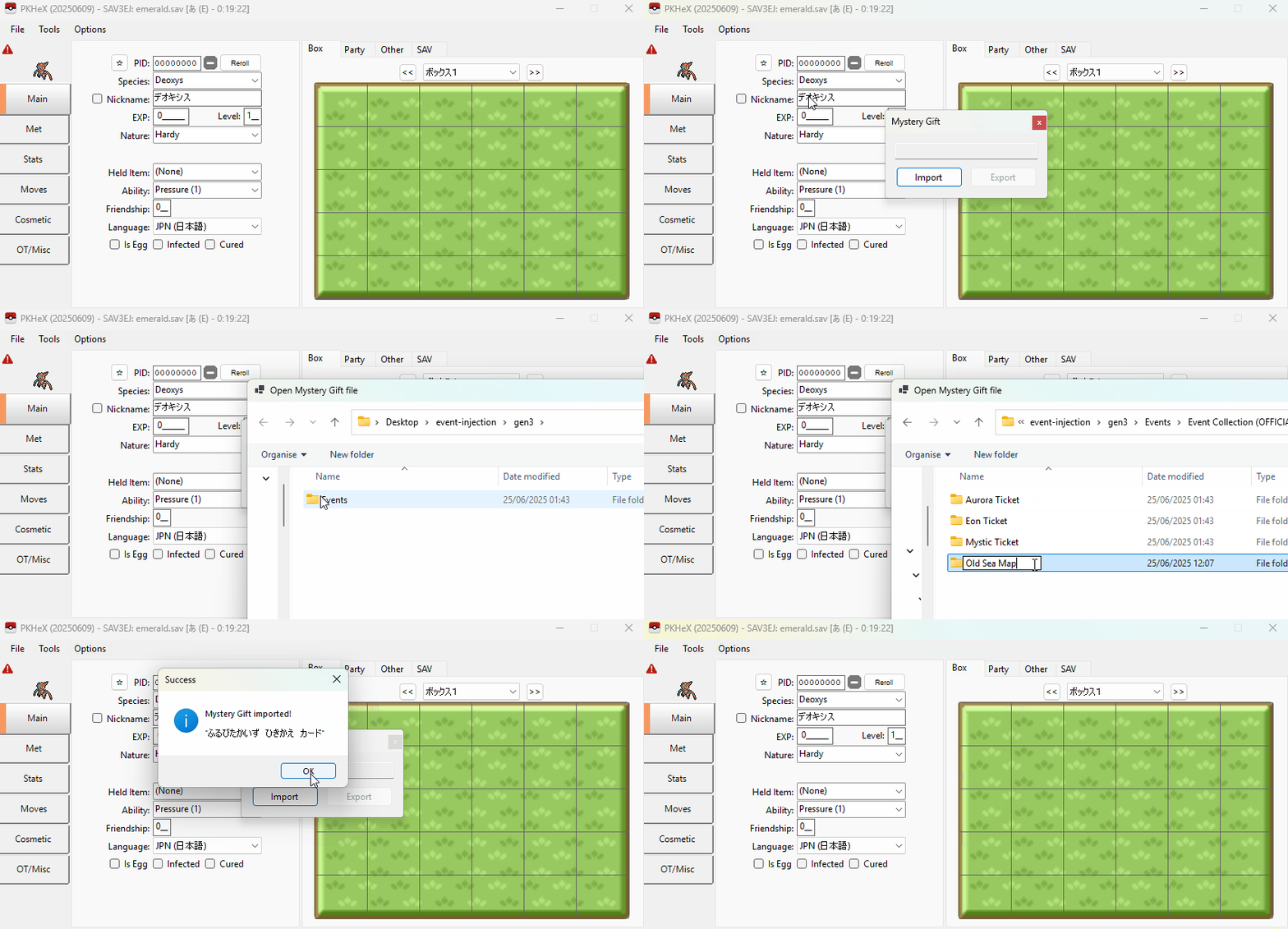
The Gen 3 WCTool provides all the Wonder Cards you will need for this process, they can be found inside the \Events\Event Collection (OFFICIAL) directory. This guide will only focus on injecting the boat ticket events, feel free to experiment with anything else in your own time.
Each .wc3 file is appropriately named so that you can understand which game and save language they belong to, for example, if we open the Old Sea Map directory we can see a file named OLD SEA MAP - E - JAP. The E represents Emerald, and JAP represents Japanese. This means that this Wonder Card is intended for Japanese copies of Emerald.
Wonder Card Injection (Using PKHeX)
- Open the save file in PKHeX if you have not already done so, then click the
Toolstab, then selectWC3 Plugin -> Mystery Gift (WC3). - Find the Wonder Card you wish to inject from the
\Events\Event Collection (OFFICIAL)directory of your Gen 3 WCTool download. - You should see a
Successpop-up. Click theOKbutton to apply the changes and close the subwindow. - Export your save file (
File -> Export Sav) and overwrite your existing save file, then load it back onto your cartridge/emulator.
Wonder Card Injection (Using Gen 3 WCTool)
- Open the Gen 3 WCTool if you have not already done so, then click the
Official Event Distributorbutton on the bottom right of the main window. - Load your save file into the subwindow, then select the Mystery Gift you wish to inject, in this example we will be injecting the Old Sea Map.
- Export the save file and overwrite your current existing save, then load it back onto your cartridge/emulator.
Figure 3 - In-game Redemption
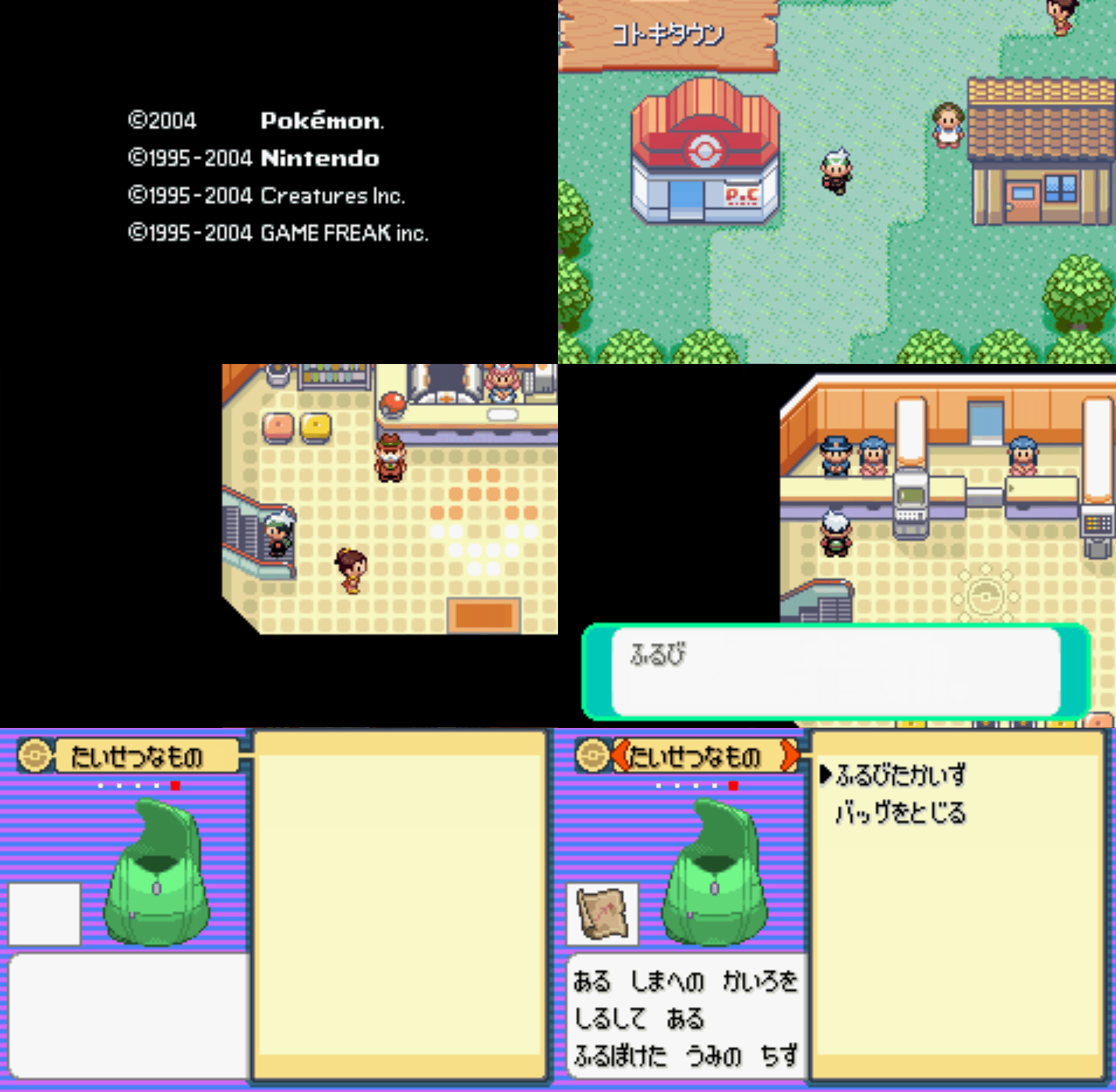
After injecting your gift, load your save file back onto your cartridge/emulator and head upstairs in any Pokémon Center to redeem your gift. If you were already saved on the upper floor you may need to exit and re-enter for the delivery man to be visible. If done correctly the delivery man should be standing next to the usual NPC on the top left.
Once you have received the gift you can head over to the docks in Slateport or Lilycove and the sailor will grant access to the map that corrisponds to your event ticket.
DS Setup Instructions
Necessary Tools
- PKHeX
- RunAsDate
- ProjectPokemon Event Gallery Wonder Cards
- A method of extracting your save file (make multiple backups!)
Setup & Installation
- Download
PKHeXand extract it to a known location on your computer, launchPKHeX.exeand confirm that it opens properly with no issues. - Download
BW_Tooland extract it to a known location on your computer, launchBW_Tool.exeand confirm that it opens properly with no issues. - Download
RunAsDateand extract it to a known location on your computer, launchRunAsDate.exeand confirm that it opens properly with no issues. - Close PKHeX, you will now need to launch RunAsDate and select PKHeX as your program to launch.
- Enter a time and date that matches your desired event distribution, this is an important step for legality purposes.
- You can find information about the distribution period of an event on ProjectPokemon or Bulbapedia.
- Extract your DS save file and place it inside a known location on your computer, then open the save file using PKHeX (
File -> Open -> Select the .sav file). - Open the Event Gallery repository and open the folder that corrisponds to your game generation.
- If you are injecting Wonder Cards into a Generation 4 game (DPPt/HGSS), open the
Released/Gen 4/Wondercardsdirectory. - If you are injecting Wonder Cards into a Generation 5 game (BW/B2W2), open the
Released/Gen 5/Wondercards Fullsdirectory. - For Generation 4 games, select the folder that corrisponds to your game language, e.g select
ENGif your cartridge/ROM is English. - For Generation 5 games you will need to look at the language tag on the
.wc5fullfilename to confirm a match. - Select and download your desired Wonder Card. For legality purposes a Wonder Card must be injected into a save file of the same language as the Wonder Card! Double check your download before continuing.
Figure 1 - Wonder Card Injection
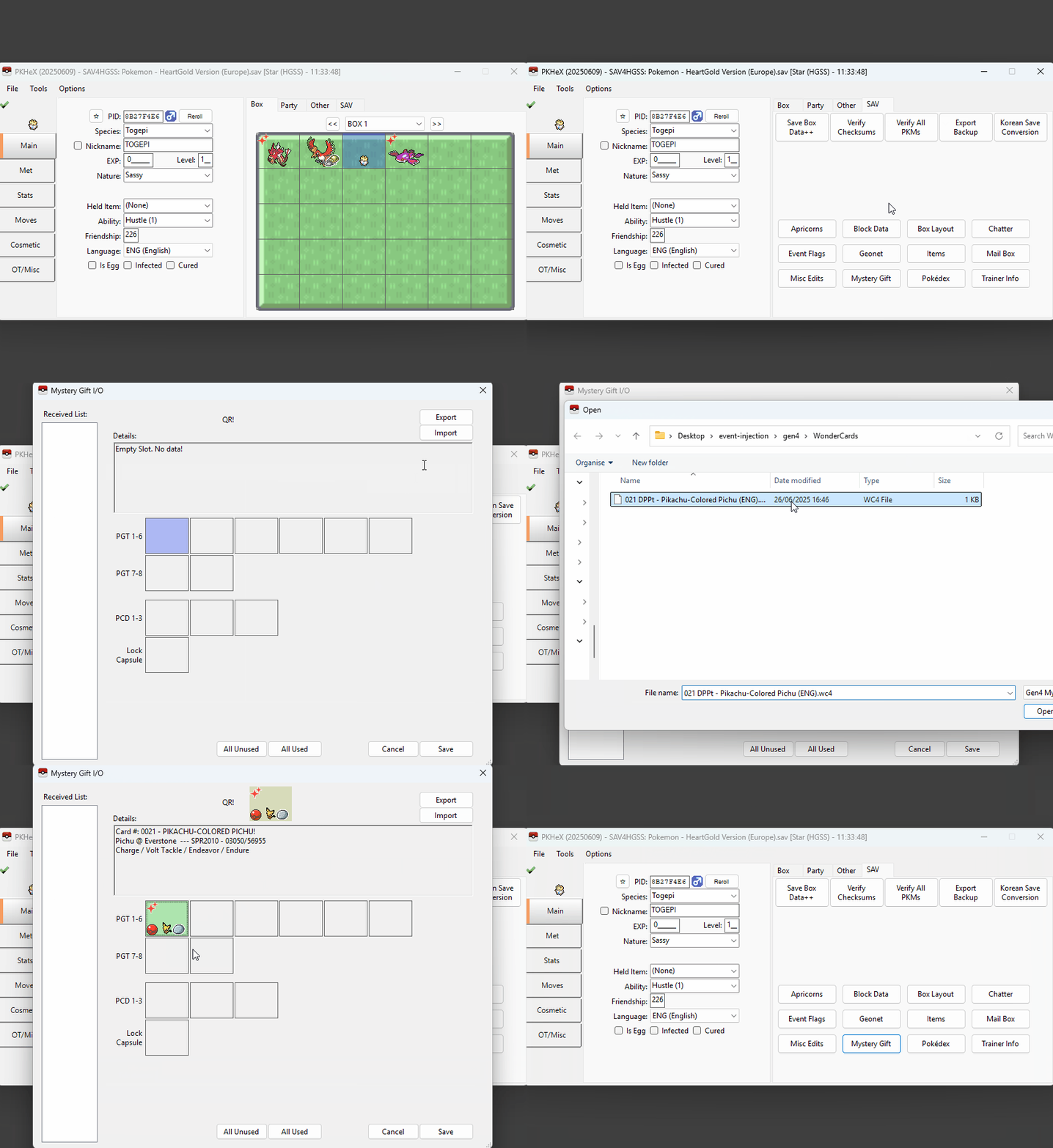
At this stage it is assumed that you have launched PKHeX using RunAsDate on a date that matches the official distribution period and that your save file is opened and ready to be edited. It is also assumed that you have done your due diligence to ensure that the Wonder Card you plan to inject matches your save file language.
Step-by-step instructions
- Open the save file in PKHeX if you have not already done so, then navigate to the
SAVtab above the box viewer. - Click the
Mystery Giftbutton to open the Mystery Gift injection subwindow. This is where you will perform the injection. - Click the
Importbutton, then select your chosen Wonder Card in the file explorer, you should now see your Wonder Card in the subwindow. - Right-click an empty Wonder Card slot in the PGT row then click
Setto apply it to your save file. You can now press theSavebutton to close the subwindow. - Export your save file (
File -> Export Sav) and overwrite your existing save file, then load it back onto your cartridge/emulator. - Visit the delivery man in-game. In Gen 4 titles he can be found inside the Poké Mart, and in Gen 5 titles he can be found inside the Pokémon Center.
Figure 2 - In-game Redemption
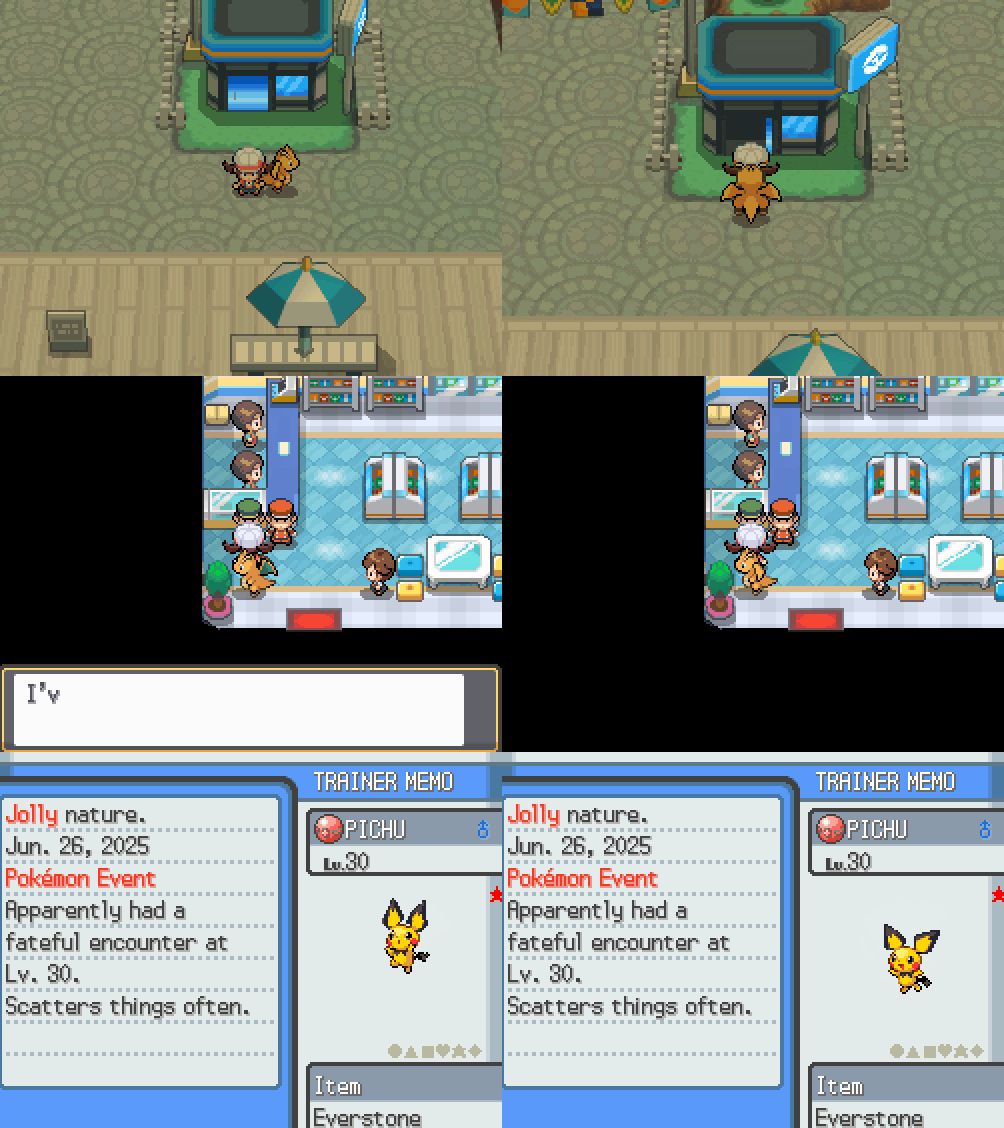
You can optionally save before collecting your gift if you wish to soft reset or RNG manipulate it for desirable values (IVs, Nature, etc).
3DS Setup Instructions
Necessary Tools
- PKHeX
- RunAsDate
- ProjectPokemon Event Gallery Wonder Cards
- A method of extracting your save file (make multiple backups!)
Setup & Installation
- Download
PKHeXand extract it to a known location on your computer, launchPKHeX.exeand confirm that it opens properly with no issues. - Download
RunAsDateand extract it to a known location on your computer, launchRunAsDate.exeand confirm that it opens properly with no issues. - Close PKHeX, you will now need to launch RunAsDate and select PKHeX as your program to launch.
- Enter a time and date that matches your desired event distribution, this is an important step for legality purposes.
- You can find information about the distribution period of an event on ProjectPokemon or Bulbapedia.
- Extract your 3DS save file and place it inside a known location on your computer, then open the save file using PKHeX (
File -> Open -> Select the .sav file). - Open the Event Gallery repository and open the folder that corrisponds to your game generation.
- If you are injecting Wonder Cards into a Generation 6 game (XY/ORAS), open the
Released/Gen 6/Wondercardsdirectory. - If you are injecting Wonder Cards into a Generation 7 game (SM/USUM), open the
Released/Gen 7/3DS/Wondercardsdirectory. - Select and download your desired Wonder Card. Check if your Wonder Card is Local Wireless/Infrared or serial Code/Nintendo Zone by researching the event on the ProjectPokemon Website.
- If your Wonder Card was distributed locally or via infared, this generally means it can be injected into any save file regardless of region.
- If your Wonder Card was distributed via serial code or Nintendo Zone, this generally means that the event was region locked.
- For region locked events, ensure the console you'll be redeeming/performing the RNG on matches a legal Region for that given event Pokémon. If doing this on Emulator, you can manually change & set the Region for one that is legal in the settings before doing your RNG.
Figure 1 - Wonder Card Injection
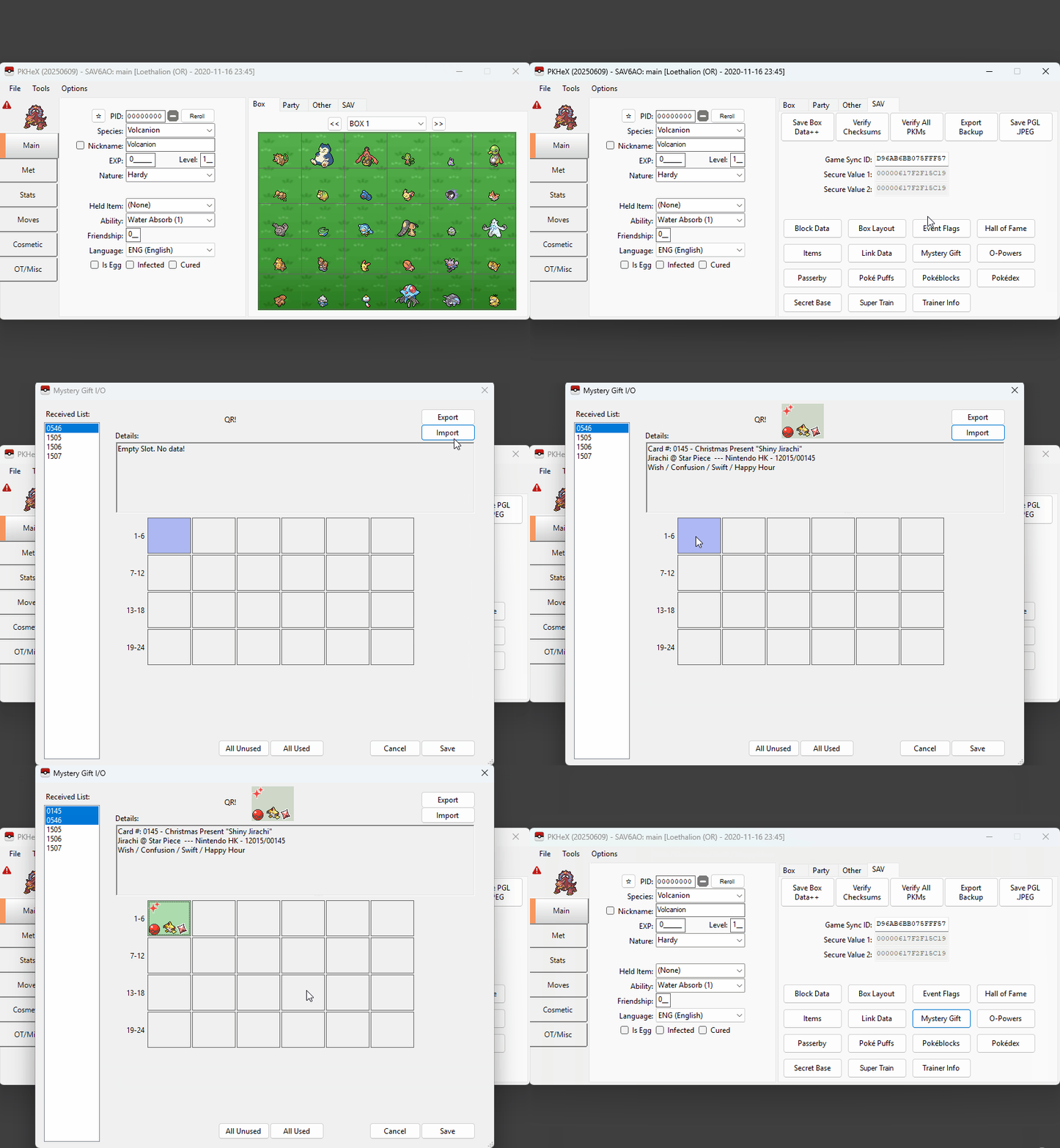
At this stage it is assumed that you have launched PKHeX using RunAsDate on a date that matches the official distribution period and that your save file is opened and ready to be edited. It is also assumed that you have done your due diligence to ensure that the Wonder Card you plan to inject will be legal on the save file you are injecting into.
Step-by-step instructions
- Open the save file in PKHeX if you have not already done so, then navigate to the
SAVtab above the box viewer. - Click the
Mystery Giftbutton to open the Mystery Gift injection subwindow. This is where you will perform the injection. - Click the
Importbutton, then select your chosen Wonder Card in the file explorer, you should now see your Wonder Card in the subwindow. - Right-click an empty Wonder Card slot in the PGT row then click
Setto apply it to your save file. You can now press theSavebutton to close the subwindow. - Export your save file (
File -> Export Sav) and overwrite your existing save file, then load it back onto your cartridge/emulator. - Visit the delivery man in-game. He can be found standing next to the desk/PC inside any Pokémon Center.
Figure 2 - In-game Redemption
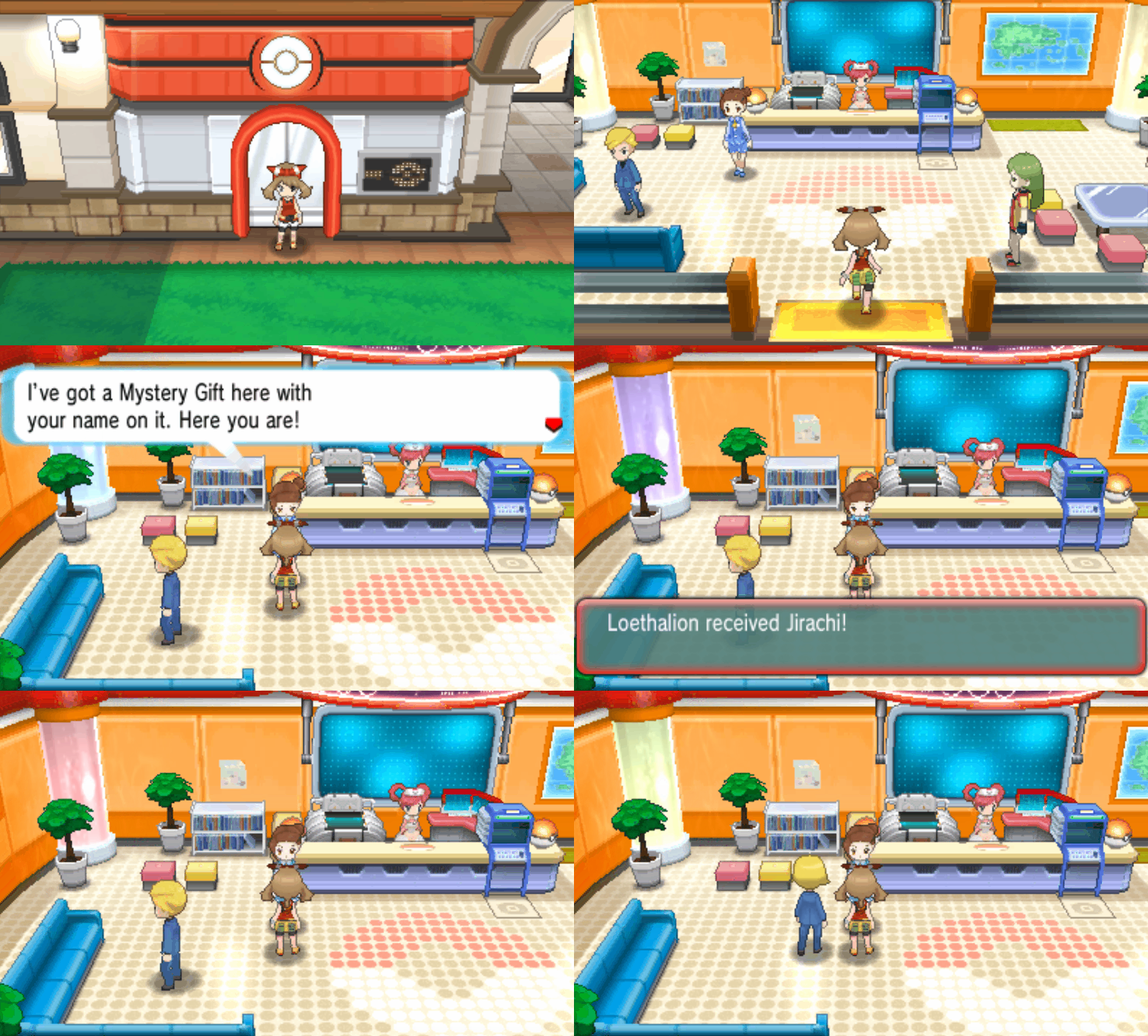
You can optionally save before collecting your gift if you wish to soft reset or RNG manipulate it for desirable values (IVs, Nature, etc).
Switch Setup Instructions
Necessary Tools
- Switch Gift Card Manager (GUI for Windows users)
- JKSV Save Manager (Save backup homebrew)
- Switch-time (Time modification homebrew)
Setup & Installation
- Download
Switch Gift Card Managerand extract it to a known location on your computer, confirm that the executable opens properly with no issues. - If you are running into issues opening the program you will likely need to install the correct .NET Runtime, do not continue until the program is opening properly.
- Download
JKSV.nrothen move the downloaded file to theSwitchfolder of your consoles SD card. - Download
switch-time.nrothen move the downloaded file to theSwitchfolder of your consoles SD card. - Reboot the console into SysCFW as you will be required to connect to official Nintendo servers to redeem your gift.
This guide takes information from the official ProjectPokemon guide in an attempt to simplify the process for the end user. It is heavily advised to read the official guide and FAQ section first before continuing.
Figure 1 - Acquiring Switch Wonder Cards
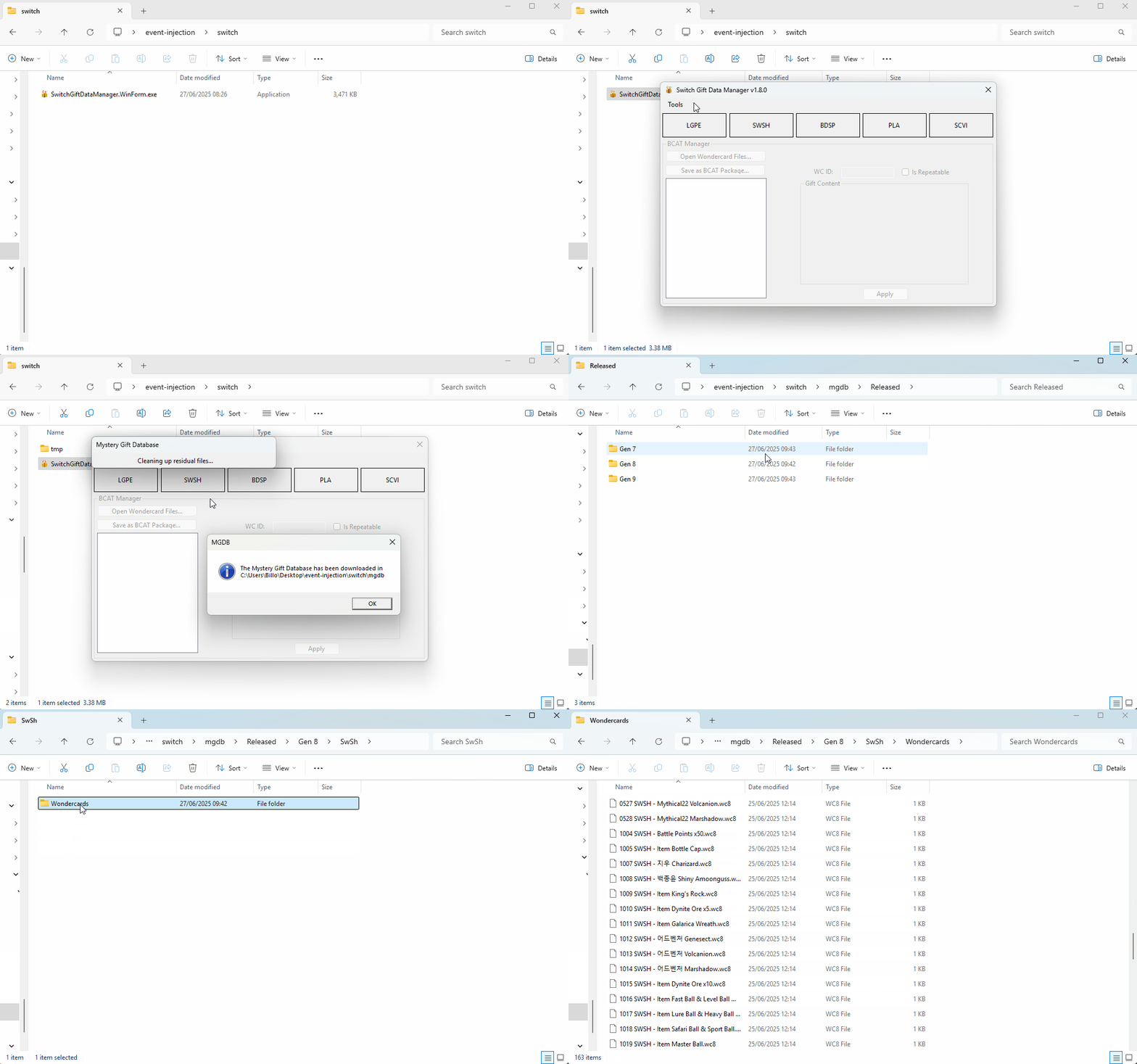
Wonder Cards for all Switch titles can be downloaded through the Switch Gift Card Manager itself by doing the following:
Step-by-Step
- Open
Switch Gift Card Manager, then click theToolsbutton in the navigation bar at the top of the window. - Click
Download latest Mystery Gift Database, then wait for the MGDB popup to show on-screen and clickOK. - You should now see a
mgdbfolder has been generated next to the Switch Gift Manager executable. This folder contains your Wonder Cards. - The
/Released/Gen 7directory contains LGPE Wonder Cards. - The
/Released/Gen 8directory contains SwSh/BDSP/LA Wonder Cards. - The
/Released/Gen 9directory contains SV Wonder Cards. - Note - "Simulated" Wonder Cards are not true dumps and should not be used if you wish to stay true to the official distribution.
- Note - With the exception of Mainland China exclusive gifts in LGPE, Switch distributions can be redeemed on any region/language save file.
Figure 2 - Verifying Distribution Date
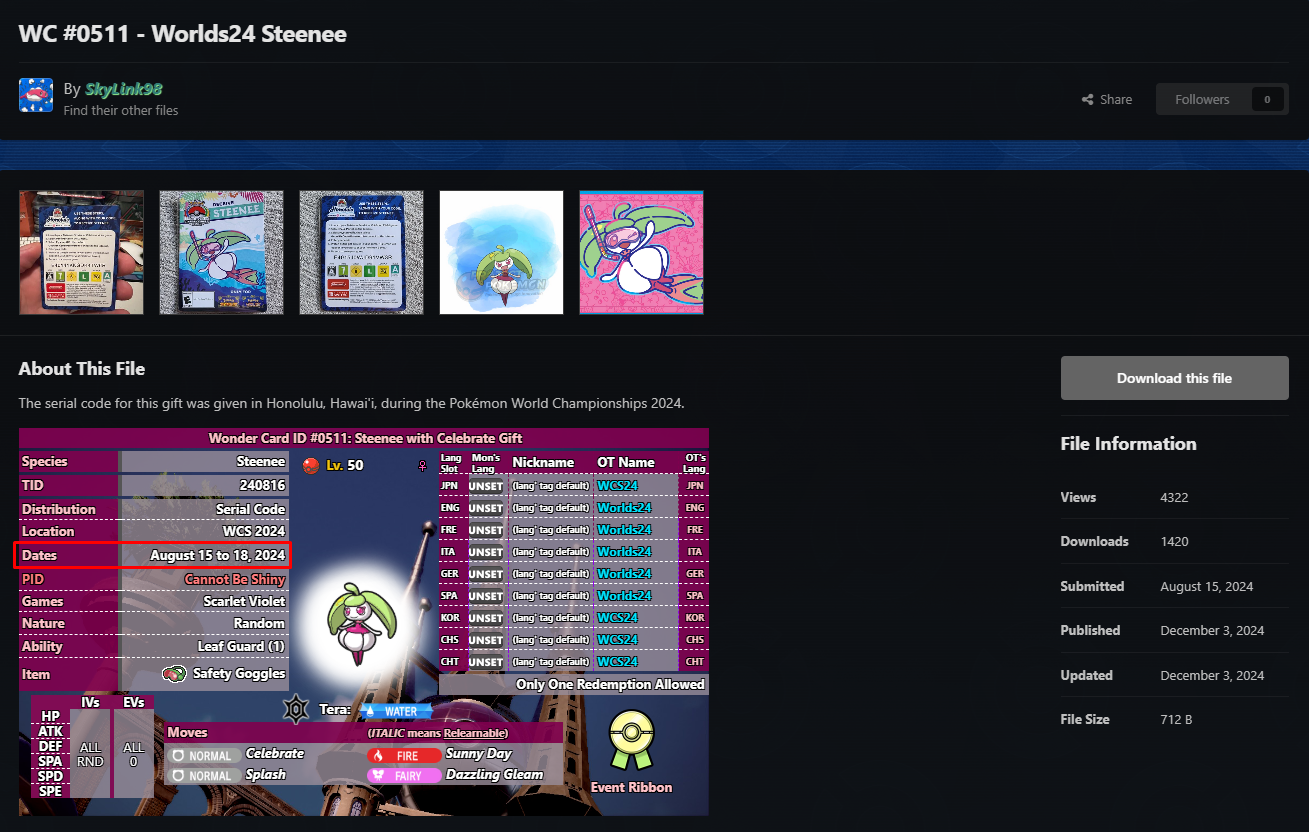
After downloading your Wonder Cards it is recommended to research the distribution you plan to inject to determine the start/end date, this is important to keep in mind for legality purposes. You can find this information on the ProjectPokemon Event Gallery Page (see Subcategories on the right). Not doing your due diligence may result in the injected Pokémon having an illegal met date depending on the game it was injected into.
In this example we will be injecting the WORLDS 24 Steenee gift, Figure 2 shows that this distribution was active August 15th - August 18th 2024. This means we will need to modify our system time to be within these dates before redeeming the distribution. Information about how to safely modify your system time will be covered later.
Figure 3 - Dumping BCAT Data

BCAT data editing is what we will use to inject the Mystery Gift into our save file. This is done using JKSV, a save manager for CFW Switch consoles. Before doing anything else it is recommended to connect online in the game you plan to inject into and saving, this will ensure that you have the most up-to-date BCAT data available. Having out of date BCAT data will result in any changes being overwritten once you connect online.
Step-by-Step
- Connect to the internet or download Wild Area News (SwSh) / PokePortal News (SV) at least once to generate the latest BCAT data.
- Save and close the game you are playing, then press the
Albumbutton to launch the Homebrew Menu. - Navigate to JKSV and open it, scroll down past user profiles ands select
BCAT, then select the game that you wish to dump BCAT data on. - Hover over
Newand hold theL + Rbuttons, then press theAbutton to begin the BCAT dump. You can now release any buttons you were holding. - A folder called
BCAT [DATE] @ [TIME]will be generated in theSD/JKSV/[Your Game ID]path. Confirm that this folder exists. - Move your dumped BCAT folder to a known location on your computer. It is suggested to make multiple copies as you will need to restore this later.
Figure 4 - Generating Wonder Card BCAT
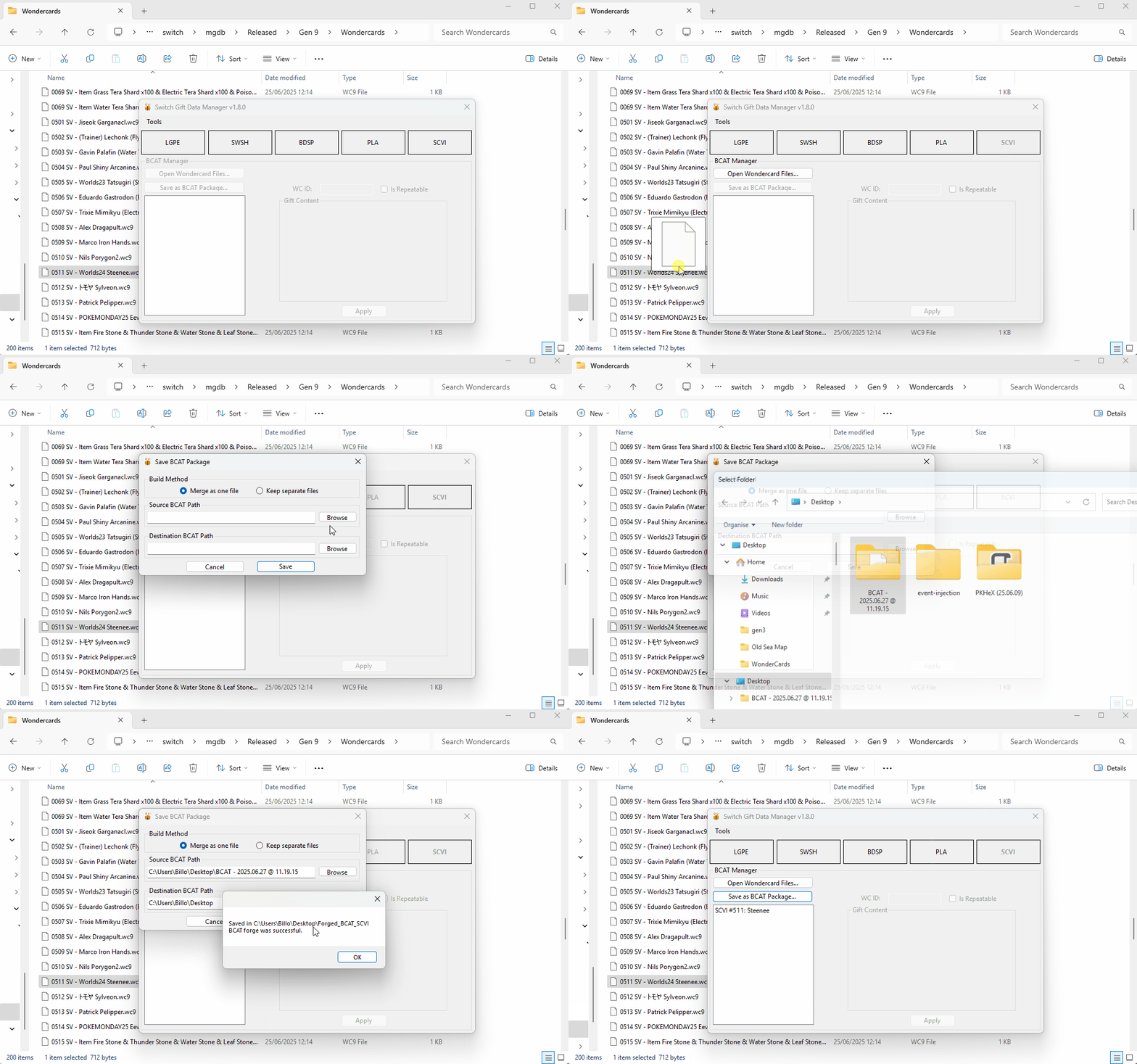
After dumping your BCAT data by following the above steps, you will need to generate BCAT data that corrisponds with the event you wish to inject, this is done using the Switch Gift Data Manager.
Step-by-Step
- Open the
Switch Gift Data Managerand select your game of choice. In this example we will be pressing theSCVIbutton as we are injecting into Scarlet/Violet. - Click the
Open Wondercard Filesbutton and select the card you wish to inject. Alternatively, drag and drop the card into the main window. - Select
Save as BCAT Package, then set theSource BCAT Pathto the folder that contains the BCAT we dumped earlier. - Set the
Destination BCAT pathto a folder in a known location on your computer, this is where the forged BCAT package will be sent to after creation. - Click the
Savebutton to save the new BCAT package. If done correctly you should now see a folder namedForged_BCAT_{Game}inside the folder created in step 4.
Figure 5 - Restoring BCAT Data
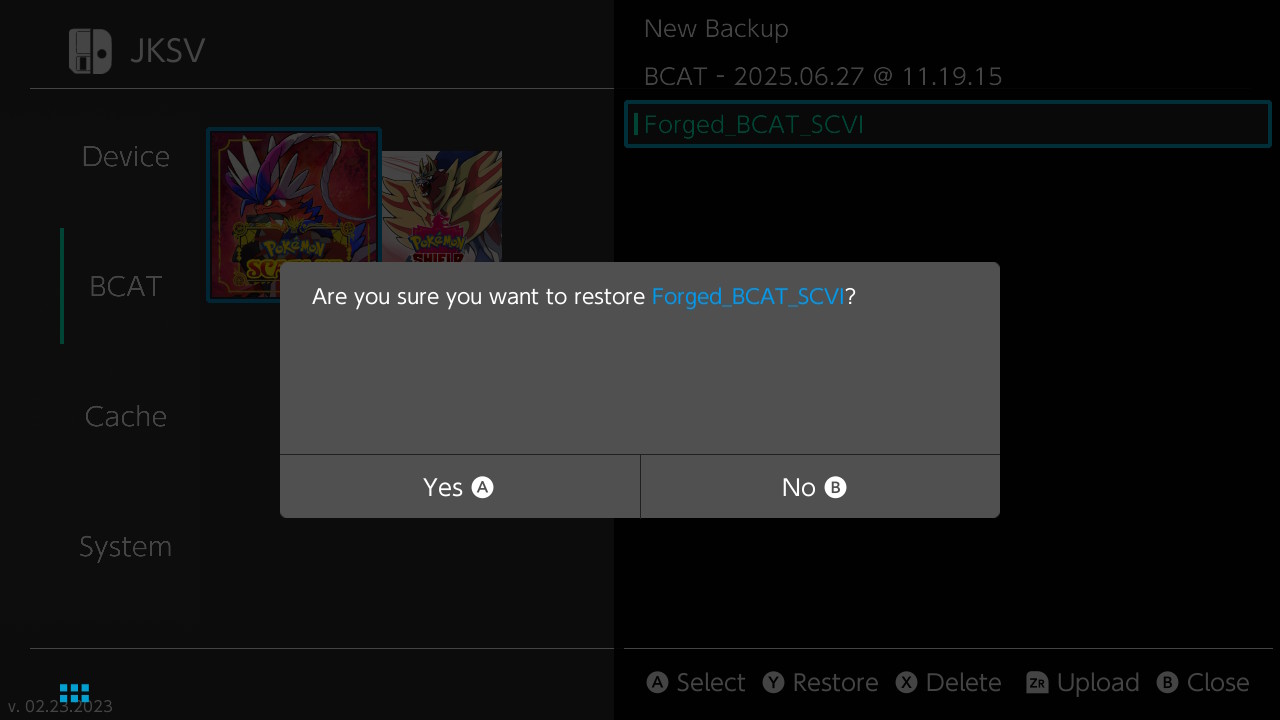
After creating your forged BCAT data using the Switch Gift Data Manager, you will need to restore the BCAT using JKSV. This process is similar to the process used to dump BCAT from earlier.
Step-by-Step
- Move the forged BCAT package folder back onto your Switch SD card, it needs to be placed inside the
SD/JKSV/[Game ID]directory. - Open JKSV again and select
BCAT, then select the game you wish to restore the forged BCAT onto. - Hover over the forged BCAT and click the
Ybutton, press theAbutton to confirm the BCAT restoration.
Figure 6 - Setting System Time

At this point you should have created and restored the forged BCAT onto the game you are playing, you will now need to set the system date to a date that matches the distribution period of your selected event for legality purposes. This is done using the switch-time Homebrew application.
Step-by-Step
- Press the
Albumbutton to launch the Homebrew Menu, then select theswitch-timeapplication. - Follow the instructions on-screen to set your system time to a valid date that matches your distribution (see Figure 2 if you are unsure what this means).
- Once you have selected a valid system time, press the
Abutton to apply these changes to your console. - Exit the Homebrew Menu and open System Settings, scroll down to date/time and confirm that your date has been set properly.
Note - If you are running into issues setting your system date, double check to make sure your console time/date is syncronized via the internet. If it is not syncronized via the internet this will not work.
Figure 7 - Redeeming Your Gift
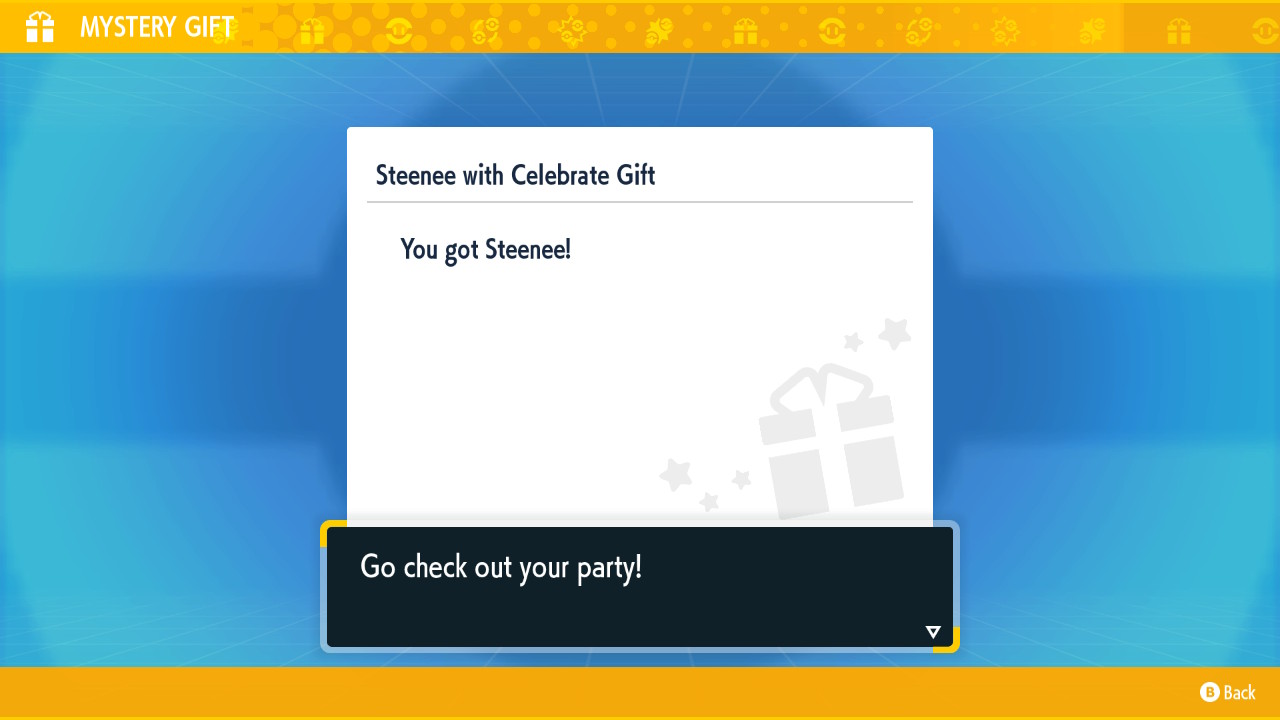
To redeem the gift, simply access the Mystery Gift feature in-game and click Redeem via internet, you should now see and be able to redeem your injected Wonder Card.